Pi-Stop Educational Traffic Light for Raspberry Pi
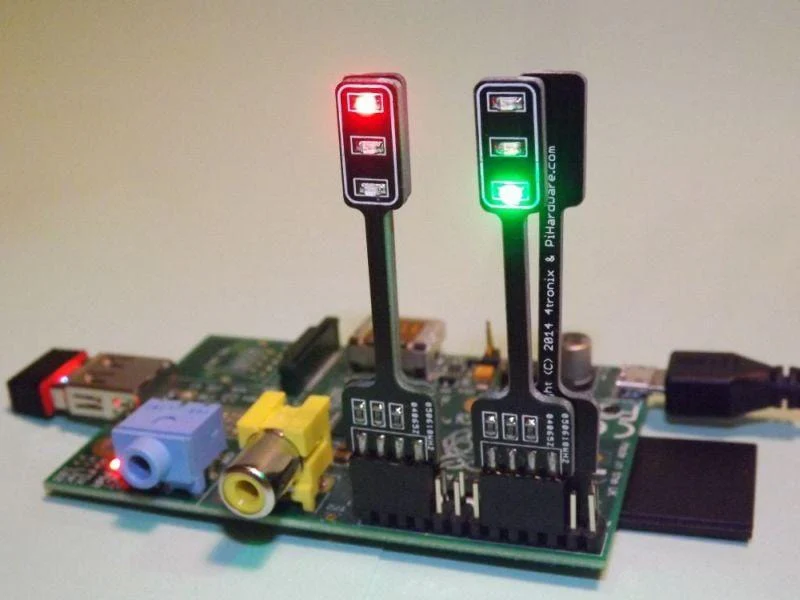
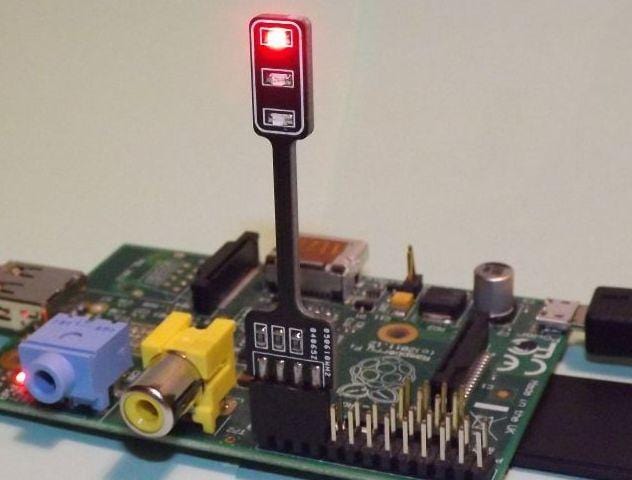
The Pi-Stop is a low-cost hardware module designed to allow Raspberry Pi users to take their first steps into interfacing with the real world.
Designed with the learning in mind, everyone will recognise and identify its familiar elements encouraging their use along-side their own projects.
Easy entry into coding
The Pi-Stop is designed to remove many of the common hurdles people are faced with when getting started using hardware with the Raspberry Pi. Often it is difficult to know what components to use and how to connect them, the Pi-Stop makes it simple by plugging directly onto pre-set positions on the Raspberry GPIO connector.
The Pi-Stop provides a simple stepping stone, between pure screen-based programming and using physical hardware to interact with the real world. Components like the Pi-Stop will provide a flexible and non-restrictive way to build understanding through experimenting.
By keeping the hardware very simple, it allows better understanding of what is happening, and allows space to come up with your own projects and apply the concepts with your own ideas in mind.
Simple hardware
By plugging the Pi-Stop directly on to the Raspberry Pi GPIO header, no extra cables or wires are needed. Unlike many other add-on boards, they do not block unused GPIO pins, keeping them open for other uses. The Pi-Stop can be fitted in 4 standard locations, allowing up to four Pi-Stops to be controlled independently or combined with other hardware.
When used with optional stands, they can be used away from the GPIO header and even daisy-chained to make up full traffic light sets.
Resources
These materials will demonstrate the concepts, methods and provide the building blocks to explore ideas and take learning further by with creative projects, activities and games:
- Discover: The Pi-Stop: Learn what the Pi-Stop is and how to use it.
- Setup: Scratch GPIO: Get up and running with Scratch GPIO ready to use with the Pi-Stop.
- Explore and Challenge Scratch GPIO: Pi-Stop First Steps: If you've not used Scratch before, this will provide a quick introduction to building your first Scratch GPIO program.
- Explore and Challenge Scratch GPIO: Pi-Stop Traffic Sequence - Create your own traffic light sequence and learn how to use Scratch GPIO with the Pi-Stop.
- Explore and Challenge Scratch GPIO: Pi-Stop Reaction Game - How fast are your reflexes? Test your reaction time with the Pi-Stop Reaction game.
- Explore and Challenge Scratch GPIO: Pi-Stop Simon Memory Game - Challenge your memory and get the highest score!
Example Workshop
The following materials were used at the Digimakers Bristol event held the @Bristol Science Centre (14th June 2014) - ready to print PDF format.
Suitable for age 6 and upwards (probably less with extra guidance), runs for 1 to 2 hours depending on ability/creativity:
-
Setup: Scratch GPIO (workshop version) - Explains how to set up Scratch GPIO
-
Explore and Challenge Scratch GPIO: Pi-Stop First Steps - Introduces how to use Scratch and using Scratch GPIO. If you are already familiar with Scratch you can skip this.
-
Explore and Challenge Scratch GPIO: Pi-Stop Traffic Sequence - Create your own traffic light sequence and learn how to use Scratch GPIO with the Pi-Stop.
-
Explore and Challenge Scratch GPIO: Pi-Stop Reaction Game - How fast are your reflexes? Test your reaction time with the Pi-Stop Reaction game.
-
Explore and Challenge Scratch GPIO: Pi-Stop Simon Memory Game - Challenge your memory and get the highest score!
Product Information
Product Information
Shipping & Returns
Shipping & Returns
Description
The Pi-Stop is a low-cost hardware module designed to allow Raspberry Pi users to take their first steps into interfacing with the real world.
Designed with the learning in mind, everyone will recognise and identify its familiar elements encouraging their use along-side their own projects.
Easy entry into coding
The Pi-Stop is designed to remove many of the common hurdles people are faced with when getting started using hardware with the Raspberry Pi. Often it is difficult to know what components to use and how to connect them, the Pi-Stop makes it simple by plugging directly onto pre-set positions on the Raspberry GPIO connector.
The Pi-Stop provides a simple stepping stone, between pure screen-based programming and using physical hardware to interact with the real world. Components like the Pi-Stop will provide a flexible and non-restrictive way to build understanding through experimenting.
By keeping the hardware very simple, it allows better understanding of what is happening, and allows space to come up with your own projects and apply the concepts with your own ideas in mind.
Simple hardware
By plugging the Pi-Stop directly on to the Raspberry Pi GPIO header, no extra cables or wires are needed. Unlike many other add-on boards, they do not block unused GPIO pins, keeping them open for other uses. The Pi-Stop can be fitted in 4 standard locations, allowing up to four Pi-Stops to be controlled independently or combined with other hardware.
When used with optional stands, they can be used away from the GPIO header and even daisy-chained to make up full traffic light sets.
Resources
These materials will demonstrate the concepts, methods and provide the building blocks to explore ideas and take learning further by with creative projects, activities and games:
- Discover: The Pi-Stop: Learn what the Pi-Stop is and how to use it.
- Setup: Scratch GPIO: Get up and running with Scratch GPIO ready to use with the Pi-Stop.
- Explore and Challenge Scratch GPIO: Pi-Stop First Steps: If you've not used Scratch before, this will provide a quick introduction to building your first Scratch GPIO program.
- Explore and Challenge Scratch GPIO: Pi-Stop Traffic Sequence - Create your own traffic light sequence and learn how to use Scratch GPIO with the Pi-Stop.
- Explore and Challenge Scratch GPIO: Pi-Stop Reaction Game - How fast are your reflexes? Test your reaction time with the Pi-Stop Reaction game.
- Explore and Challenge Scratch GPIO: Pi-Stop Simon Memory Game - Challenge your memory and get the highest score!
Example Workshop
The following materials were used at the Digimakers Bristol event held the @Bristol Science Centre (14th June 2014) - ready to print PDF format.
Suitable for age 6 and upwards (probably less with extra guidance), runs for 1 to 2 hours depending on ability/creativity:
-
Setup: Scratch GPIO (workshop version) - Explains how to set up Scratch GPIO
-
Explore and Challenge Scratch GPIO: Pi-Stop First Steps - Introduces how to use Scratch and using Scratch GPIO. If you are already familiar with Scratch you can skip this.
-
Explore and Challenge Scratch GPIO: Pi-Stop Traffic Sequence - Create your own traffic light sequence and learn how to use Scratch GPIO with the Pi-Stop.
-
Explore and Challenge Scratch GPIO: Pi-Stop Reaction Game - How fast are your reflexes? Test your reaction time with the Pi-Stop Reaction game.
-
Explore and Challenge Scratch GPIO: Pi-Stop Simon Memory Game - Challenge your memory and get the highest score!